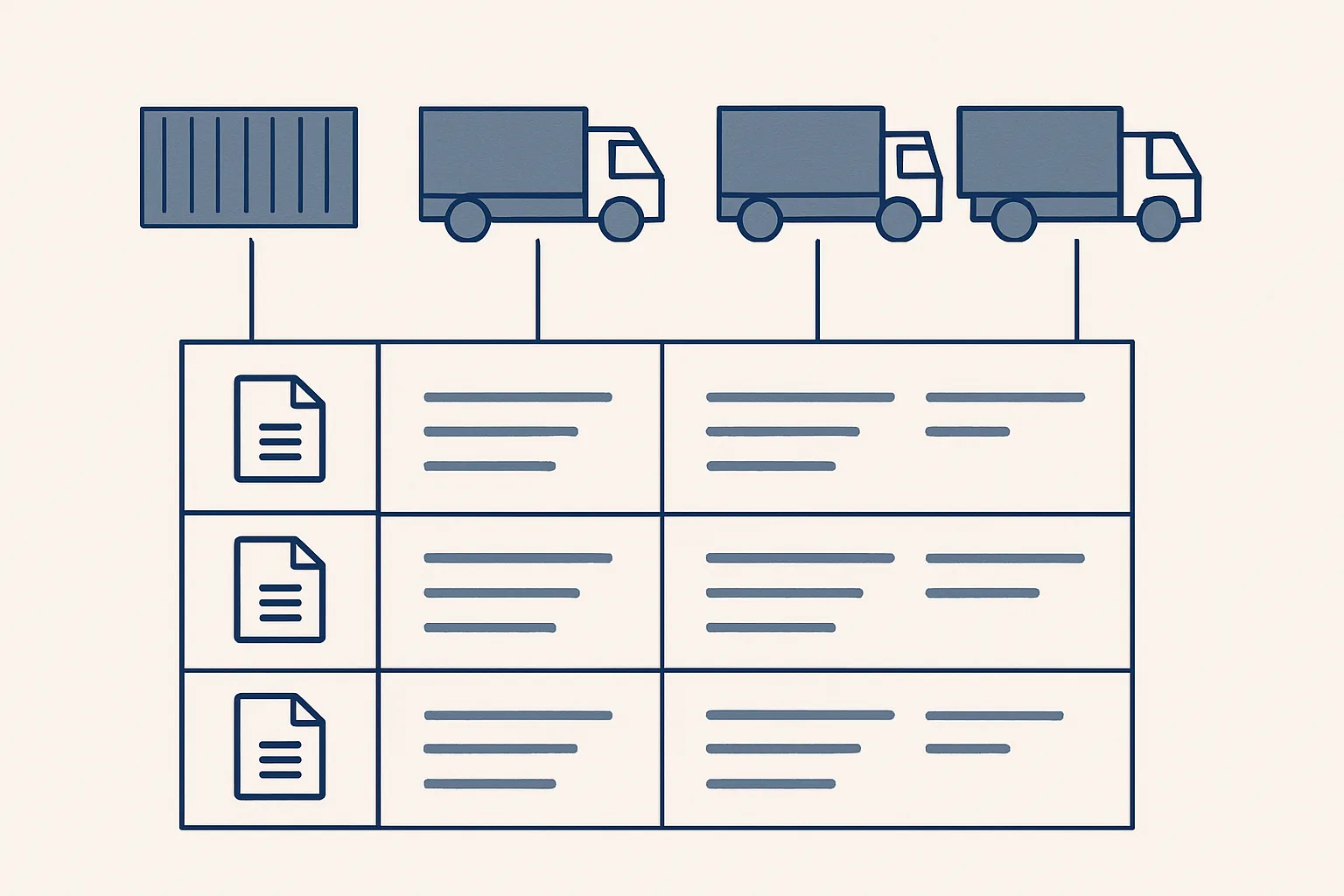
Stock management software suits warehouses with many small movements a day. If you move goods by the truck or container, a register with one row per shipment and its documents linked is often a better fit, and it gives you the stock position too.
Do you have two kinds of stock?
Whether stock management software fits depends on how your goods move: many small picks from shelves, or a few big loads that each come with a pile of paperwork.
Picture two businesses. The first is a parts distributor with thousands of product codes on shelves, dozens of orders a day and stock picked a few units at a time. Its problem is counting: what's on which shelf, what needs reordering, what was picked for which order.
The second is a trading company that buys a load from a mill, trucks it to a customer and sometimes holds part of it at a rented yard. It moves a handful of loads a week, but each one produces an order confirmation, a delivery note, a weight ticket, a transport document, a supplier invoice and a sales invoice.
Both call what they hold stock. The first needs to track units. The second needs to track shipments and the documents that prove what happened to each. The tools that suit one are often awkward for the other.
When does stock management software fit?
It fits when you have many product codes, frequent small movements and a need to know quantities by location at any moment.
This kind of software is built around the item. Every unit received, moved, picked or sold is a transaction, and the system keeps a running count. Good packages handle barcodes, reorder points, shelf locations, batch numbers and stock value. In bigger operations, warehouse management automation goes further, sending pickers along routes and planning which dock gets which delivery.
The cost is discipline. The count is only right if everyone records every movement, every time. That works in a warehouse with scanners and a trained team. It works less well in a small trading office where goods rarely touch your premises and the people involved are buyers and salespeople, not storekeepers.
Signs it's the right tool.
- You hold hundreds or thousands of product codes.
- Goods are picked in small quantities, many times a week.
- You run your own warehouse or shelves, with people whose job is receiving and picking.
- Customers expect to see availability before they order.
- Reordering is driven by minimum quantities, not by individual deals.
When does a shipment register fit?
It fits when goods move in a few large loads, each tied to a specific purchase and sale, and the paperwork matters as much as the quantity.
A shipment register is a table with one row per truck, container or delivery. Each row holds what was bought, from whom, at what price, what was sold, to whom, where the goods are now and which documents belong to it. In a sheet your team already uses, it's easy to read and easy to share with your accountant.
For a trader, inventory management automation is less about counting and more about keeping these rows complete. The questions that cost time are rarely "how many units are left?" They're: has the delivery note for this load arrived, which supplier invoice matches it, did we invoice the customer, and where's the weight ticket the customer is asking for?
The table compares the two on the points that usually decide it.
| Point | Stock management software | Shipment register in a sheet |
|---|---|---|
| What it records | The item and its quantity | The shipment: one truck, container or delivery |
| Best for | Many small movements from shelves | Few large loads tied to specific deals |
| Documents | Often attached, but secondary | Central: each row links its own documents |
| Who keeps it up to date | Storekeepers scanning each movement | Rows filled from the documents as they arrive |
| Stock position | Running count by item and location | The open rows: received but not yet delivered |
| Learning curve | A new system to learn | A sheet the team already reads |
| Weak point | Wrong if any movement is missed | Awkward with very many product codes |
Software or a shipment register?
Tick each line that is true of your business. The more you tick, the more a shipment register in a sheet is likely to suit you better than stock management software.
How do documents link to each row?
A shipment register is worth the most when every document is linked to its row, so anyone can open one line and see the whole story of a load.
This is where logistics document management meets stock records. A load isn't finished when it's delivered. It's finished when the purchase is matched, the sale is invoiced and the proof is filed. When documents sit in separate mailboxes and folders, someone spends hours rebuilding that story whenever a customer, a supplier or an accountant asks a question.
An AI employee can keep those links. As documents arrive in the mailbox or a drop folder, it reads them, works out which shipment they belong to and fills the row. Here's one load at a building-materials trader.
- A purchase is agreed and a row is opened with the supplier, product, quantity and price.
- The supplier's order confirmation arrives by email. The robot reads it, links it to the row and notes any difference from what was agreed.
- The delivery note and weight ticket arrive. The robot files them under the shipment and records the delivered quantity.
- The supplier invoice arrives. The robot links it to the same row and prepares the draft bill.
- The sales invoice is prepared from the row and left ready in your accounting software.
- Anything that doesn't match, like a quantity that differs from the delivery note, goes to a person instead of being guessed.
- Every link and change is written to a log.
How do you see your stock from the register?
A shipment register gives you a stock position without a separate count: what's been received and not yet delivered is what you hold.
Give each row a status, like ordered, in transit, in the yard or delivered, and the open rows are your stock. Filter by location to see what sits at each yard. Filter by product to see how much of one grade is unsold. Because each row carries its purchase price, the same register can show what the stock cost you.
Our price history robot, which runs today for a client, works in a similar spirit: a list of every product line ever bought and sold, with its price per unit, built from past invoices and kept up to date, so quotes start from the last real price. A shipment register applies the same idea to loads. We offer the stock and shipment register built to order. It isn't running for a client yet.
What a register doesn't do: direct pickers, scan barcodes or plan a warehouse. If those are your daily problems, stock management software is the better tool. Nothing stops you using both, with the register covering the documents.
How do you move from one to the other?
Moving works best with a clean cut-off date and the open loads copied over first.
The move is easier than it sounds if you treat it as a list of open items, not a migration of history. Old records stay where they are, read-only, and the new tool starts from a known position.
The same AI employee can help. It reads the open documents for each load in the mailbox and suggests the starting rows, which a person checks against the accountant's figures. Nothing is changed in the old system, and nothing goes live without your yes.
A sensible order of work.
- Pick a cut-off date, ideally a month end your accountant already works to.
- List every open shipment or stock item on that date, with its documents.
- Agree the columns your team really needs, and drop the rest.
- Run old and new side by side for a short while and compare the stock position.
- Decide who approves changes, and keep a log of every one.
Questions
What's the difference between inventory and stock management?
The words are often swapped. In practice, stock management usually means tracking goods on hand and their movements. Inventory management can also cover planning, buying and valuation.
Can a spreadsheet replace stock management software?
For a business with a few large loads, a well-kept register in a sheet often does the job and is easier for the team. For many products and frequent small movements, dedicated software is the safer choice.
What is a shipment register?
A table with one row per truck, container or delivery, showing what was bought and sold, from and to whom, where the goods are and which documents belong to that load.
Can AI keep a stock register up to date?
It can read incoming documents, link them to the right row and fill in quantities and dates, flagging anything that doesn't match. You still approve bills and invoices. We offer this built to order.
How do I value stock held in a register?
Each row can carry its purchase price, so the open rows give a cost figure. How stock should be valued in your accounts is a question for your adviser.
Tell us your workflow. We will build it around you.
Write to [email protected] with how your goods move and the hours your team spends finding shipment documents each month. We'll tell you plainly which approach fits.
Talk to us Related service: Stock and shipments

